Sunday, 7 April 2024

Vector Data Base - Primer using Chroma DB

What is Vector database

A vector database is a kind of database that is designed to store, index and retrieve data points with multiple dimensions, which are commonly referred to as vectors.

Each deimension capture particular feature. Key concepts are Vectors and Similarity Search. Vectors are numerical array. Similarity search uses indexing and searching algorithms, most relevant to the query.

Vector database stores in embeddings, nothing but numerical codes which encapsulate the key charecteristics of obejct of interest.

Difference between tradiotional and Vector database

Tradional based on the scalar datatypes, 2 dimensional - rows and column- table like structure, optimized for transactional data and exact match by methods like search queries.

Vector based on vector data types, multi dimensional space structure. optimized for AI and ML applications and seacrh methods involving  semantic seacrh (cosine Similarity) and similarity search.  

Benefits:

Fast and Accurate Seach
Mostle correct Response
Semantic Understanding

Handson

Enter to colab using your goocle account

create a new note with name demo_chromadb

Click +Code cell

add this code to install chromadb abd senetence-transformer

!pip install chromadb -q
!pip install sentence-transformers -q

Click +Code, add this code to create a client

import chromadb

client = chromadb.Client()
collection = client.create_collection("aucse_demo")

Click +Code, add this code to add documents


collection.add(
    documents=["This is a document about cat", "This is a document about car"],
    metadatas=[{"category": "animal"}, {"category": "vehicle"}],
    ids=["id1", "id2"]
)

Click +Code, add this code to make a semantic query

results = collection.query(
    query_texts=["vehicle"],
    n_results=1
)
print(results)


You will get ouput like

{'ids': [['id2']], 'distances': [[0.8069301843643188]],
'metadatas': [[{'category': 'vehicle'}]],
'embeddings': None,
'documents': [['This is a document about car']],
'uris': None, 'data': None
}

The above DB is in Memory. So it is very easy and simple.
If you want to create a persistent vbdir, add five files of .txt.


Crete a folder in your notebook called 'vbdb' add some files

Click +Code, add this code to  Reading a file from folder

import os

def read_files_from_folder(folder_path):
    file_data = []

    for file_name in os.listdir(folder_path):
        if file_name.endswith(".txt"):
            with open(os.path.join(folder_path, file_name), 'r') as file:
                content = file.read()
                file_data.append({"file_name": file_name, "content": content})

    return file_data

folder_path = "/content/vbdir"  # your folder path
file_data = read_files_from_folder(folder_path)

for data in file_data:
    print(f"File Name: {data['file_name']}")
    print(f"Content: {data['content']}\n")

Click +Code, add this code to  make collections

documents = []
metadatas = []
ids = []

for index, data in enumerate(file_data):
    documents.append(data['content'])
    metadatas.append({'source': data['file_name']})
    ids.append(str(index + 1))

pet_collection = client.create_collection("pet_collection")

pet_collection.add(
    documents=documents,
    metadatas=metadatas,
    ids=ids
)

Click +Code, add this code to  get results

results = pet_collection.query(
    query_texts=["What are the different kinds of pets people commonly own?"],
    n_results=1
)
print(results)

Click +Code, add this code to  get metadata

metadatas

Click +Code, add this code to  get results for a new query

results = pet_collection.query(
    query_texts=["What are the different kinds of pets people commonly own?"],
    n_results=1
)
print(results)

Click +Code, add this code to  get results for a new query

pet_collection.query(
    query_texts=["What are the emotional benefits of owning a pet?"],
    n_results=1,
    where_document={"$contains":"reptiles"}
)
print(results)


results = pet_collection.query(
    query_texts=["What are the emotional benefits of owning a pet?"],
    n_results=1,
    where={"source": "Training and Behaviour of Pets.txt"}
)
print(results)


Click +CODE to use different model

from sentence_transformers import SentenceTransformer

model = SentenceTransformer('paraphrase-MiniLM-L3-v2')

documents = []
embeddings = []
metadatas = []
ids = []

for index, data in enumerate(file_data):
    documents.append(data['content'])
    embedding = model.encode(data['content']).tolist()
    embeddings.append(embedding)
    metadatas.append({'source': data['file_name']})
    ids.append(str(index + 1))

click +code to add for Creating a new collection

pet_collection_emb = client.create_collection("pet_collection_emb") pet_collection_emb.add( documents=documents, embeddings=embeddings, metadatas=metadatas, ids=ids )

Code to search again

query = "What are the different kinds of pets people commonly own?" input_em = model.encode(query).tolist() results = pet_collection_emb.query( query_embeddings=[input_em], n_results=1 ) print(results)

Code to make a query about what foods are recommended for dogs

query = "foods that are recommended for dogs?"
input_em = model.encode(query).tolist()

results = pet_collection_emb.query(
    query_embeddings=[input_em],
    n_results=1
)
print(results)


Wednesday, 20 March 2024

Building an SMART CLASS ROOM APP in 5 Minutes using ChatGPT

 Create Mobile App

Step 1:

Get the code from https://chat.openai.com/ Login using your google A/C.

Give prompts : 

P1: I want to create Reservation of a Smart class room app. Please generate the mobile responsive code for HTML, CSS and JavaScript. Add gradient background color

You will get 3 code snippets index.html, style.css, script.js.

Copy only the styles.css code, paste to new directory say "ALLOTSCR" in the name styles.css and save.

body {
    margin: 0;
    padding: 0;
    font-family: Arial, sans-serif;
    background: linear-gradient(to bottom, #4facfe, #00f2fe);
  }
 
  .container {
    max-width: 600px;
    margin: 50px auto;
    padding: 20px;
    background-color: rgba(255, 255, 255, 0.8);
    border-radius: 10px;
  }
 
  h1 {
    text-align: center;
    color: #333;
  }
 
  .form {
    margin-top: 20px;
  }
 
  label, input, select, button {
    display: block;
    margin-bottom: 10px;
  }
 
  input, select, button {
    width: 100%;
    padding: 10px;
    border: 1px solid #ccc;
    border-radius: 5px;
  }
 
  button {
    background-color: #4caf50;
    color: white;
    cursor: pointer;
  }
 
  button:hover {
    background-color: #45a049;
  }
 
  p#message {
    margin-top: 10px;
    text-align: center;
  }
 

P2: Please add code for view the reserved dates and restrict reservation if it is already reserved.

You will get modified code for html and js files. Again you type the below as prompt in chatGPT.

P3: Add functionalities in the above mobile app. To display reserved date and time slot, to restrict reserve if already time slot and date is reserved

You will get again html and Js modified files. Now you copy the index.html and script.js in seperate files in the above directory as index.html and script.js

index.html

<!DOCTYPE html>
<html lang="en">
<head>
  <meta charset="UTF-8">
  <meta name="viewport" content="width=device-width, initial-scale=1.0">
  <title>Smart Classroom Reservation</title>
  <link rel="stylesheet" href="styles.css">
</head>
<body>
  <div class="container">
    <h1>Smart Classroom Reservation</h1>
    <div class="form">
      <label for="date">Select Date:</label>
      <input type="date" id="date" name="date">
      <label for="time">Select Time Slot:</label>
      <select id="time" name="time">
        <option value="morning">Morning</option>
        <option value="afternoon">Afternoon</option>
        <option value="evening">Evening</option>
      </select>
      <button onclick="checkReservation()">Check Reservation</button>
      <p id="reservation-status"></p>
      <button onclick="reserveClassroom()">Reserve</button>
      <p id="message"></p>
    </div>
    <div class="reserved-dates">
      <h2>Reserved Dates and Time Slots:</h2>
      <ul id="reserved-list">
        <!-- Reserved dates and time slots will be dynamically added here -->
      </ul>
    </div>
  </div>
  <script src="script.js"></script>
</body>
</html>

script.js

var reservations = [];

function checkReservation() {
  var date = document.getElementById("date").value;
  var time = document.getElementById("time").value;
  var reservationStatus = document.getElementById("reservation-status");

  // Check if the selected date and time slot are already reserved
  if (reservations.find(r => r.date === date && r.time === time)) {
    reservationStatus.innerText = "This time slot is already reserved.";
  } else {
    reservationStatus.innerText = "This time slot is available for reservation.";
  }
}

function reserveClassroom() {
  var date = document.getElementById("date").value;
  var time = document.getElementById("time").value;
  var message = document.getElementById("message");

  // Check if date and time are selected
  if (date && time) {
    // Check if the selected date and time slot are already reserved
    if (reservations.find(r => r.date === date && r.time === time)) {
      message.innerText = "This date and time slot are already reserved.";
    } else {
      reservations.push({ date: date, time: time });
      message.innerText = "Classroom reserved for " + date + " " + time + ".";
      updateReservedSlots();
    }
  } else {
    message.innerText = "Please select both date and time.";
  }
}

function updateReservedSlots() {
  var reservedList = document.getElementById("reserved-list");
  reservedList.innerHTML = "";
  reservations.forEach(function(reservation) {
    var listItem = document.createElement("li");
    listItem.innerText = "Date: " + reservation.date + ", Time: " + reservation.time;
    reservedList.appendChild(listItem);
  });
}

Save all theree files. Compress these 3 files to to a zip file.

Step2:

go to https://wl.tools/tiiny_host.

Login thru your google a/c

Upload/Drag and dropy your zip file. It will give online URL. Copy the https://orange-marylynne-81.tiiny.site/  (in my case)


Step 3: Convert to play store app 

Go to https://www.webintoapp.com/.

Go to app maker tab. Give URL as your copied URL (as above),  mobile for Simulator and Press Make APP.

It will do some process and give URL. Copy that  URL for this App, If you paste into browser you  may get similar screen as shown below:


In dashboard, click Maker Tab. It will give screen like this.

One it is done, you will get Mobile APP like this 


Wow You have done it in Just 5 Minutes.!!!! 
You can download zip file and store it in your PC. You can extract. You can see apk file. which can be used in installing in Android phones.
Have fun by modifying the above code!!!
YTC referred : https://www.youtube.com/watch?v=EsRyyJmO-u8
Web sites refrred:
https://chat.openai.com/
https://codepen.io/
https://wl.tools/tiiny_host
https://www.webintoapp.com/app-maker 😂😂😂😂😂🎈yaxh180223$@gmail.com

Tuesday, 19 March 2024

Building a Chatbot Using the Google PaLM API and FrontEnd with Flask

Pathway Language Model (PaLM)

It is a powerful  LLM for Generative AI by Google.

Let us use this to make ChatBot.

Step 1:

Go to https://makersuite.google.com/app/apikey

Login using your Google A/C 

Get palm_api_key and store in safe place

Create a New directory "PALMCHAT"in your Hard Drive.

Below PALMCHAT create another sub directory "template"

Step 2: [Backend- Server]

Now in Visual Studio Code, Open Folder PALMCHAT

Create the file .env and put the following contents

OPENAI_API_KEY = "palm_api_key"

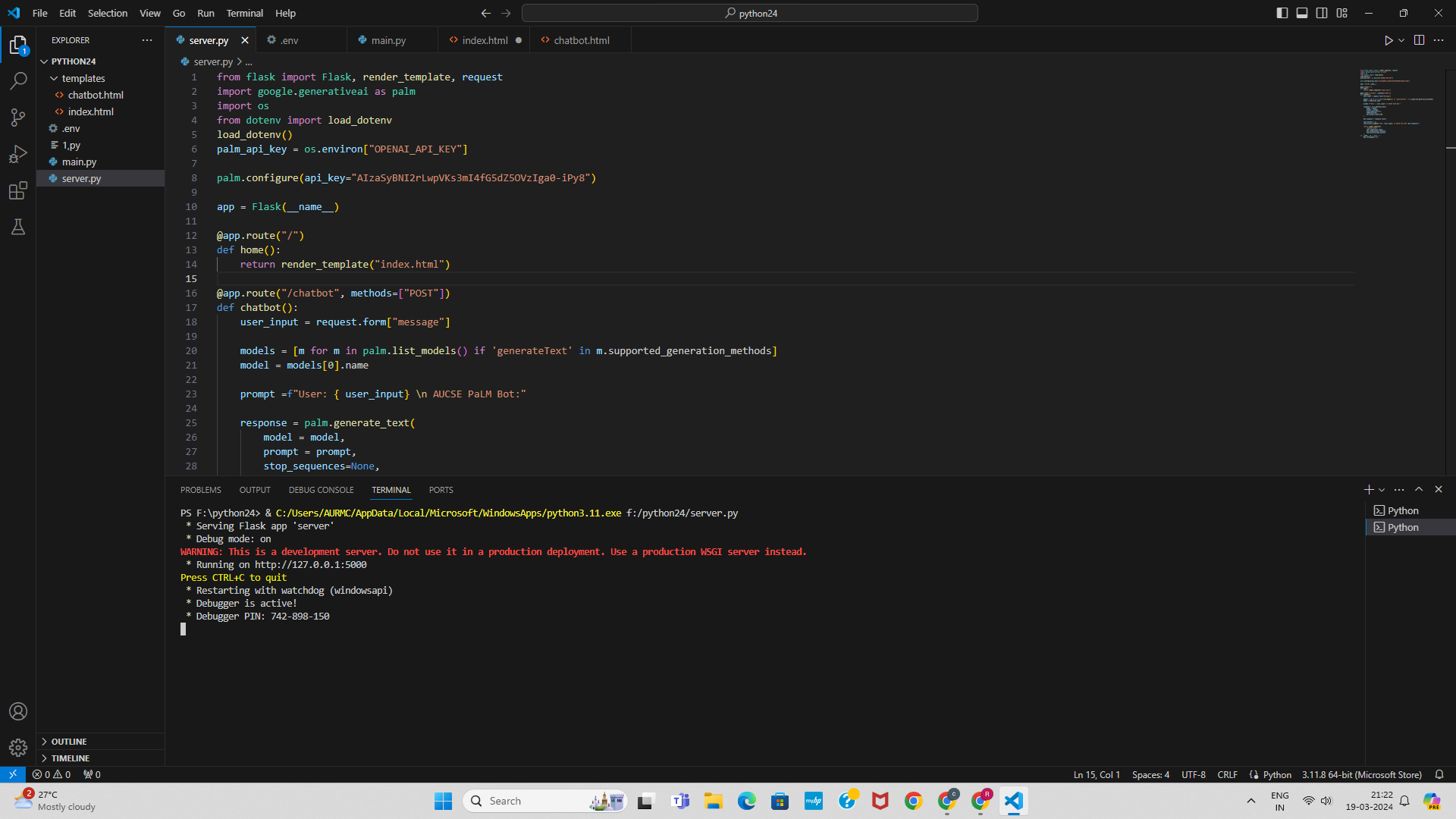
Create another file server.py andd add the following code:

from flask import Flask, render_template, request
import google.generativeai as palm
import os
from dotenv import load_dotenv
load_dotenv()
palm_api_key = os.environ["OPENAI_API_KEY"]

palm.configure(api_key="AIzaSyBNI2rLwpVKs3mI4fG5dZ5OVzIga0-iPy8")

app = Flask(__name__)

@app.route("/")
def home():
    return render_template("index.html")

@app.route("/chatbot", methods=["POST"])
def chatbot():
    user_input = request.form["message"]
   
    models = [m for m in palm.list_models() if 'generateText' in m.supported_generation_methods]
    model = models[0].name
   
    prompt =f"User: { user_input} \n AUCSE PaLM Bot:"

    response = palm.generate_text(
        model = model,
        prompt = prompt,
        stop_sequences=None,
        temperature=0,
        max_output_tokens=100
    )

    bot_response = response.result

    chat_history = []
    chat_history.append(f"Use: {user_input} \n AUCSE Palm BOT {bot_response}")

    return render_template(
        "chatbot.html",
        user_input=user_input,
        bot_response=bot_response,
        chat_history=chat_history
    )
if __name__ == "__main__":
    app.run(debug=True)


 In terminal 

pip install flask
pip install dotenv
pip install google.generativeai

Step 3: [Front End- index, chatbot.htmls files ]

Under the subdirectory create files index.html with the following contents

<html lang="en">
<head>
    <meta charset="UTF-8">
    <meta name="viewport" content="width=device-width, initial-scale=1.0">
    <title>AUCSE PaLM Bot</title>
</head>
<body>
    <h1>AUCSE PaLM BOT</h1>
    <p>AUCSE PaLM Bot: Welcome to our AUCSE ! </p>
    <form method="post" action="{{url_for('chatbot')}}" class="chat-input">
        <input type="text" id="message" name="message" placeholder="type your msg...">
        <button type="submit">Send</button>    
    </form>
</body>
</html>

create anotherfile chatbot.html with the following code (same as above with little modification with adding after <h1> tag <p>{{bot_response}}<p>
<html lang="en">
<head>
    <meta charset="UTF-8">
    <meta name="viewport" content="width=device-width, initial-scale=1.0">
    <title>AUCSE Chat Bot</title>
</head>
<body>
    <h1>AUCSE PaLM BOT</h1>
    <p>{{bot_response}}</p>
     <form method="post" action="{{url_for('chatbot')}}" class="chat-input">
        <input type="text" id="message" name="message" placeholder="type your msg...">
        <button type="submit">Send</button>
    </form>
</body>
</html>

Now run server.py by clicking the top right button play(run) . You will get screen similar according to your environment

If you click the above image, you will see the contents clearly. You can see the server running,
with line Running on http://127.0.0.1:5000. If you move your mouse, place on that, and CTRL + CLICK, you will get browser window similar as shown below:
If you enter question 
What is AWS?
You will get screen as shown below:

Wow ! It is so Simple to generate a basic PalM based Chat bot with google Generative Ai and Flask in Python. 

You can modify model, parameters like temperature, max_number_tokens, etc., as per your will and requirements. You can add features.
You can beautify with css in html files for stunning look and feel. Deep dive in to PaLM!! Have greate Fun and Enjoy! Sky is even no Limit?!


Sunday, 17 March 2024

Bot to read our local PDF and answer using Openai, Embeddings, Langchain & Streamlit

Chat with PDF  | Chatbot Bio-query use case

In visual code Studio, creat directory usecase3 and creat a file search.py

pip install chatpdf

load and split pdf

Create a file names search.py

#load and split pdf

from langchain.document_loaders import PyPDFLoader
loader = PyPDFLoader("test.pdf")
pages_content = loader.load_and_split()
print(len(pages_content), pages_content)


You will get dictionary output with filename, meta data, page no etc.

Now type as below and Run

#load pdf and split

from langchain.document_loaders import PyPDFLoader
loader = PyPDFLoader("test.pdf")
pages_content = loader.load_and_split()
#print(len(pages_content), pages_content)

# #refer openai api embeddings

from langchain.embeddings.openai import OpenAIEmbeddings
from langchain_openai import OpenAIEmbeddings
from langchain.vectorstores import FAISS


embeddings = OpenAIEmbeddings()
db = FAISS.from_documents(pages_content, embeddings)

db.save_local("faiss_index")  # to save local copy

nwdb = FAISS.load_local("faiss_index", embeddings,
                        allow_dangerous_deserialization=True)

query = "are there any educational qualification"
docs  =  nwdb.similarity_search(query) # to create similarity index
# print(docs)

from langchain.chains import RetrievalQA
from langchain.chat_models import ChatOpenAI
llm = ChatOpenAI()  # creat chatbot

qa_chain = RetrievalQA.from_chain_type(llm, retriever=nwdb.as_retriever())
res =qa_chain({"query" : "are there any educational qualification"})
print(res)

Save and Run as streamlit run app.py  to get streamlit.app tab in the browser 

Pl. double click the image to see clearly. 

Now type in the text window Educational qualification in bullet points  
and then press play button. You may get the screen as shown below:


Wow ! we have done a chatbot answering questions from my test.pdf

This is the simplest way with openai, embeddings, langchain and streamlit we could develope our custom made chatbot. This is the beginning. You can change code in app.py by refereinng streamlit documentation  to change your frontent and enjoy!!!😊😊😊😊😊😊😊😊
Please use your PDF and change queries as per your PDF.🎈

Tuesday, 12 March 2024

AskCodi.ai for Student

What is askCodi.ai?

Intelligent virtual assistant powered by AI technology. Offers personalized learning experiences. Integrates seamlessly into educational environments. Paradigm shift in coding How askCodi.ai Helps Students and Teachers:

Personalized Learning:

Understands individual learning styles. Delivers personalized recommendations and resources. 24/7 Assistance: Provides round-the-clock support for students. Alleviates burden on teachers. Interactive Learning Experiences: Engages students with quizzes, simulations, and games. Motivates active participation and deepens understanding. Efficient Communication: Streamlines communication between teachers and students. Facilitates collaboration and assessment.

Use Case and Tutorial Resources:

Scenario: High school student preparing for Python Lab Exam. Features: Access to practice problems and solutions. Step-by-step explanations for challenging concepts. Interactive quizzes and simulations. Real-time assistance and collaboration. Tutorial Resources: Instructional videos, study guides, and learning materials. A typical Demo Session --------------------------- Hands on ----------------------------------------------------------------------------------- Login to app.askCodi.com using google account In Left side Apps Section, you can see Codi Chat, Codi Workbook, Translate Choose Codi Workbook Create work book by filling the asked details like Project, description etc Click create project Python Lan, Language, Python 3 to get the screen like this. UI is very user friendly as shown @ end. From the above screen type in first window : Binary search Binary Sort and then click Buttons, Generate to generate code Explain to get simple explanation in english Document to document Test for test code generation Now you can see all the sections immediately. So easy for Student as well as teacher. Wow! What a Immersive coding tech. is informative, colloborative, productive!. Please dive in to this askCodi to enjoy every bit of programming! Happy Coding ! 😂😂😂😂


Monday, 11 March 2024

Prompt Engineering Demo using Gemini on 14.03.2024 @CSE, AU

Demo140324 done exclusive for CSE Students. For any clarifications contact author.

A G E N D A

-------------------------------------------------------------------------------------------------------------------------

  • Video Release  Avatar Base CSE Promotion by HOD
  • Heygen Preperation Demo 
  • III. Simple Prompts for Coding+
  • IV. PE Parameters

------------------------------------------------------------------------------------------------------------------------
https://gemini.google.com

Prompts (fun way to Learn) | Multimodal!!!

1. Basic Example

Write code that asks the user for their name and say "Hello"

2. Turn Comments Into Code

"""
1. Create a list of tourist spots in chidambaram, tamilnadu, india
2. Create a list of ratings for these spots
3. Combine them to make a json object of 10 spots with their ratings.
"""

3. Complete Functions or Next Line

# function to multiply two numbers and add 75 to it
 
def divide(

4. MySQL Query Generation

"""
Table departments, columns = [DepartmentId, DepartmentName]
Table students, columns = [DepartmentId, StudentId, StudentName]
"""
Create a MySQL query for all students in the Computer Science department

5.  Inserting Data

CREATE TABLE departments (
  DepartmentId INT PRIMARY KEY,
  DepartmentName VARCHAR(50)
);
CREATE TABLE students (
  DepartmentId INT,
  StudentId INT PRIMARY KEY,
  StudentName VARCHAR(50),
  FOREIGN KEY (DepartmentId) REFERENCES departments(DepartmentId)
);
Given the database schema above, generate valid insert statements include 4 rows for each table.

6. Explain Code
SELECT students.StudentId, students.StudentName
FROM students
INNER JOIN departments
ON students.DepartmentId = departments.DepartmentId
WHERE departments.DepartmentName = 'Computer Science';
Explain the above SQL statement.

7. Debugging code
"""
SELECT students.StudentId, students.StudentName
FROM students
INNER JOIN 
ON students.DepartmentId = departments.DepartmentId
WHERE departments.DepartmentName = 'Computer Science';
"""
Debug the above statements 

8. Can you create a stunning profile website with html, css and javscript

9. Teach me De Morgan's laws in simple sentences

10. Can you define AI acting like a kid, grad student, researcher and expert in one statements respectively

11. Act like a cooking Expert. Can you recipe for Biryani

12. Can you prepare quantity of grocery list for the above recipe to serve family of 5 members?

13. Can you order the above items in amazon store

14. Can you list the name of Faculty in the web page @https://annamalaiuniversity.ac.in/E04_factmem.php?dc=E04

15. Summarize @Gmail 

16. "Translate the sentence 'Hello, how are you?' from English to Tamil."
Phrase Translation Prompt:

17. Create a google script create a Google 5 MCQ in the topic "Annamalai University"

19. Prove SIN A/ Cos A = TAN A

20. Can you sing Indian National Anthem?

----------------------------------------------------------------------------------
21.. Create a image puppies with flower basket

22. can you create a love song?

23. Write 10 tamil movies and the words with emojis in table

24. Some fun stuff

Crack a joke based on " Why Tomatoes is red?"
Tell me moral story in 5 lines
Tell me a story about thirsty crow in 5 lines
Act like a Poet. Tell me a story about thirsty crow in 5 lines
List down 5 simple tongue twisters
Give me Current News Digest today?
What do mean by 143
What do you mean by 420?
What do you mean by 100?
What do you mean by 80/20 Paradigm?
What do you mean by LoL?

Zero shot : [Prompt] Write you tech script for my tech review channel

One Shot:  Using this ex1 as refernce, then [prompt] ~ related to IPhone

Few Shot: Using this ex1, ex2, ex3  as refernce, then [prompt]

Write a 5 minute script on the latest Iphone camera specifications for my tech review channel. Start with a 10 sec hook and notate a photo for each main point

Arithmetic reasoning:

What is the diameter of Sun?
~ let us go step by step
What is a simple quadratic formula?
~ let us go step by step


Bonus Prompt for Teachers: 

I am a teacher. I have to set Question Paper for Model Test. The following are the topics in the syllabus """ Definition – Types of random variables – probability distribution function – probability density function – expectation and moments – moment generating functions – joint probability distribution – marginal probability distribution function – joint probability density function – marginal probability density function – conditional probability density function""". Help me set up Question Paper with the following format. Part A contains 5 questions from the above topics each with 2 marks. Part B contains 4 questions from the above topics each with 5 marks. Part C contains 1 question either or type from the above topics with 10 marks. Put the questions in table structure with Q.NO, Question, Marks, Bloom's Taxonomy Level, CO, PO, PSO . Please provide PART B and PART C with Numerical problem oriented questions for under grad students in civil engineering

------------------------------------------------------------------------------------
Sumup Notes: Summarizing, Classifying, Translating, Writing email, resume, blogs, websites, Roadmaps for particular career, Study Schedule, Class Notes, Interview prepeartion, MCQ  testing etc. 

Any time, Any where, Anyhow? Companion

Knowledge begins Perplexity.ai

 ----------------------------------------------------------------------------------

Brief  Discussion on PE Parameters for LLM fine Tuning

Temperature : Temperature controls the randomness of the model's output. Lower value is determinitic

Max Tokens: Max tokens define the maximum length of the generated output. 

Top-p (Nucleus) Sampling: Top-p sampling limits the vocabulary size considered during sampling, ensuring that the generated tokens are from the most probable candidates. (0<p<1)

Nucleus Sampling: Top-p sampling is also known as Nucleus sampling. In this approach, the model selects tokens from the "nucleus" of the probability distribution, where the cumulative probability mass is concentrated.

Watch out this blog posts for Fine Tuning LLM using Parameters...!!!
-------------------------------------------------------------------------------------

Subscribe you tube channel for some more enlightening videos


index.html

Mobile Tea/Coffee POS Chai POS Mobile Tea/Coffee & Snacks Billing ...